What UX Design Really Means for Modern Websites
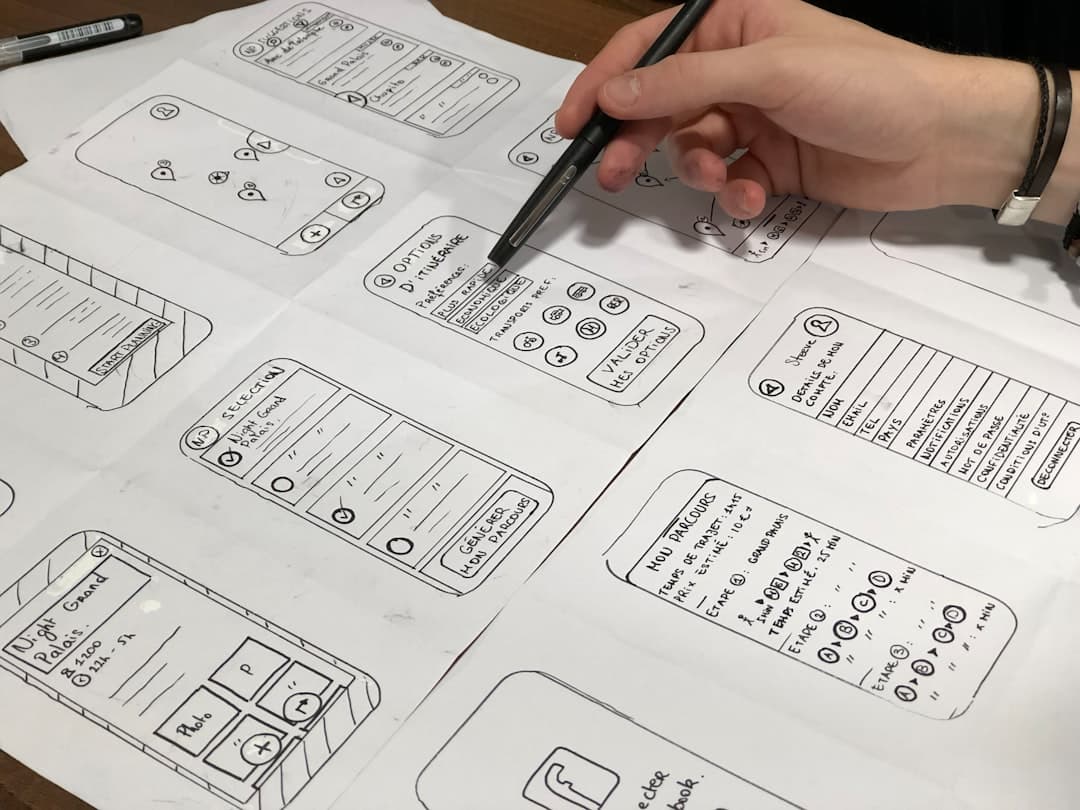
UX design for websites is the practice of shaping every interaction, layout decision, and content choice around how real people think, feel, and behave. It blends user research, information architecture, visual design, and usability testing into a single discipline that turns a static page into a tool people actually want to use. Good UX is invisible. Bad UX is the reason visitors leave in seconds.
In 2026, UX has stopped being a deliverable handed to a developer. It is the strategy that decides whether a website earns trust, drives conversions, and ranks in search. Google now treats user signals like dwell time, scroll depth, and interaction quality as ranking inputs, which means UX and SEO are bound together. A site can have perfect on-page optimization and still lose traffic if the experience frustrates people once they arrive.
This guide breaks down the full UX process for websites: research methods, IA principles, visual hierarchy, accessibility, conversion patterns, and the testing loops that keep a site improving long after launch. Whether you are designing in Framer, WordPress, or Webflow, the principles below apply the same way.
The Foundation: User Research and Personas
Every solid UX project starts with research, not with a template. The goal is to understand who the visitor is, what they are trying to accomplish, and what blocks them from getting there. Skip this and every later decision becomes a guess.
Qualitative Methods
Talk to real users. Five to seven interviews per persona is enough to surface the patterns that matter. Ask about the job they hired the website to do, not their opinions on color or layout. Watch screen recordings from tools like Hotjar or Microsoft Clarity to see where people hesitate, rage-click, or abandon a flow.
Quantitative Methods
Pair interviews with analytics. Google Analytics 4 reveals which pages convert and which leak traffic. Heatmaps show what people actually click versus what designers assumed they would click. Funnel reports expose the exact step where visitors give up. Together, these data sources turn UX from opinion into evidence.
Building Useful Personas
A persona is a compressed summary of a real audience segment. Skip the stock photos and fake names. Capture the goals, the constraints, the questions they bring to the site, and the alternatives they are considering. Three or four personas covers most B2B sites. Reference them in every design review, because abstract debates about “the user” lead nowhere.
Information Architecture: The Skeleton Beneath Every Good Site
Information architecture is how content is grouped, labeled, and connected. Get it right and visitors find what they need without thinking. Get it wrong and even beautiful design cannot save the experience. The pages of a website should map cleanly to the mental model your audience already holds.
Card Sorting and Tree Testing
Card sorting asks users to group topics in ways that make sense to them. Tools like OptimalSort or Maze run this in minutes with remote participants. Tree testing checks whether users can find specific items inside your proposed navigation. Both methods cost almost nothing and prevent the most expensive UX mistake: a sitemap that only makes sense to the people who built it.
Navigation Patterns That Work in 2026
Top-level navigation should hold five to seven items maximum. Mega menus work for content-heavy sites but collapse to a clean hamburger on mobile. Sticky headers keep navigation accessible during long scrolls. Breadcrumbs become essential anywhere a visitor might land deep in the site through search. The rules have not changed in a decade because human short-term memory has not changed either.
Visual Hierarchy and Layout
Visual hierarchy controls what the eye sees first, second, and third. It is the difference between a page that communicates instantly and a page that forces visitors to hunt. The tools are size, weight, color, contrast, and spacing, used in service of a single decision: what matters most on this page?
F-Pattern and Z-Pattern Reading
Eye-tracking research from Nielsen Norman Group still holds. On text-heavy pages, eyes move in an F-pattern, scanning headlines and the start of paragraphs. On simpler hero layouts, they trace a Z-pattern from logo to CTA. Headline, subhead, and primary action belong on those paths. Anything off the path needs to fight for attention or get cut.
White Space Is a Feature
Generous spacing is what separates a site that feels premium from one that feels chaotic. Padding around CTAs makes them more clickable. Margins between sections let visitors process one idea before moving to the next. The trend toward minimalist website design is not an aesthetic preference, it is a usability decision rooted in cognitive load research.
Accessibility: UX for Everyone
Accessibility is not a checkbox at the end of a project. It is a UX requirement from the first wireframe. Roughly 15 percent of the global population has a disability that affects how they use the web. Designing for them improves the experience for everyone else too, because the same principles that help screen reader users also help mobile users in bright sunlight or noisy environments.
WCAG 2.2 Essentials
Aim for WCAG 2.2 AA compliance. The core requirements: color contrast ratios of 4.5:1 for body text and 3:1 for large text, keyboard navigation for every interactive element, descriptive alt text on meaningful images, visible focus states, and labels on every form field. Tools like axe DevTools and Lighthouse catch most issues automatically.
Designing for Assistive Tech
Screen readers depend on semantic HTML. Use real headings in order, real buttons instead of styled divs, and real form labels instead of placeholder hacks. ARIA attributes fill the gaps when semantic HTML cannot. Test with VoiceOver on macOS or NVDA on Windows at least once per project.
Conversion Patterns That Earn Trust
UX and conversion are not separate concerns. A site that converts well is a site that respects the visitor’s time, answers their questions in order, and removes friction at every step. The patterns below appear on almost every high-performing site in 2026.
Above-the-Fold Discipline
The hero section has three jobs: state who the product is for, what it does, and what to do next. A clear value proposition, supporting subhead, and one primary CTA. Social proof close behind. Anything beyond that belongs further down the page. Sites that try to say everything above the fold end up saying nothing memorable.
Social Proof Placement
Logos of recognized customers, testimonials with real names and faces, case study results with actual numbers. Place social proof where doubt naturally appears: right after the value prop, before the pricing section, near the final CTA. Avoid generic stars without context. Specific quotes outperform vague praise every time.
Reducing Form Friction
Every field on a form is a small ask. Cut anything that is not essential to the next step. Use inline validation so users know they made a mistake before they hit submit. Show progress indicators on multi-step forms. The best lead capture form on a SaaS landing page asks for the minimum needed to start a conversation.
Usability Testing and Iteration
Launch is not the end of UX work. It is the start of the feedback loop that makes a site better month over month. Testing reveals the gap between how designers thought visitors would behave and how they actually do.
Moderated vs Unmoderated Tests
Moderated tests, where you watch a user navigate live, surface deeper insights but cost more time. Unmoderated tests through tools like Maze or UserTesting scale to dozens of participants but miss the nuance of follow-up questions. Most teams blend both: a few moderated sessions per quarter, ongoing unmoderated tests on every major release.
A/B Testing With Discipline
A/B tests work when sample sizes are large enough and changes are isolated. Test one variable at a time. Run tests until statistical significance, not until you like the result. Document every test, including the losers, because the patterns across many tests teach more than any single winner.
UX in Framer: Why the Tool Matters
The platform you build on shapes what UX is possible. Heavy CMS systems often force layout compromises, slow load times, and limited interaction design. Modern visual builders close that gap. Framer in particular gives designers control over micro-interactions, page transitions, and responsive behavior without leaning on a developer for every change.
Page speed is part of UX, and Framer ships sites with edge hosting and image optimization built in. Compare that to a typical Framer vs WordPress setup where speed depends on theme bloat, plugin choices, and hosting tier. The best UX decisions are easier to execute when the platform is not fighting you. For a deeper look at what is possible, browse our Framer website examples for inspiration on hierarchy, animation, and conversion structure.
Frequently Asked Questions
How long does a UX design process take for a website?
A focused UX engagement runs four to eight weeks for most marketing sites. Research and IA take one to two weeks, wireframes and prototypes another two, visual design and iteration round out the rest. Larger sites with complex flows can stretch to three months. Skipping research to save time almost always costs more in revisions later.
What is the difference between UX and UI design?
UX covers the full experience: research, structure, flow, and how people feel using the product. UI is the visual layer: typography, color, components, and the look of every screen. Strong UI cannot rescue weak UX, but strong UX with weak UI still leaves money on the table. Most senior designers handle both, with specialists brought in on larger projects.
Do I need a UX designer for a small business website?
Yes, but the scope changes. A small business site does not need months of research. It needs someone who understands its audience, can map a clear path from landing page to inquiry, and tests the result with real visitors. Many small businesses get the UX they need by working with designers who use battle-tested patterns and validated frameworks instead of starting from zero.
How do I measure UX success after launch?
Track conversion rate, bounce rate, time on page, and task completion rate. Pair quantitative data with qualitative feedback from session recordings and user interviews every quarter. Set baselines at launch, then watch the trend lines. UX is a long game, and the sites that win are the ones that ship small improvements every month.
Ready to Build a Site That Actually Works
Great UX is the result of clear thinking, real research, and disciplined iteration. Pick the right platform, ground every decision in user behavior, and treat launch as the start rather than the finish. If you want a partner who handles the full process from research to live site, see how our team approaches design and what working together looks like.